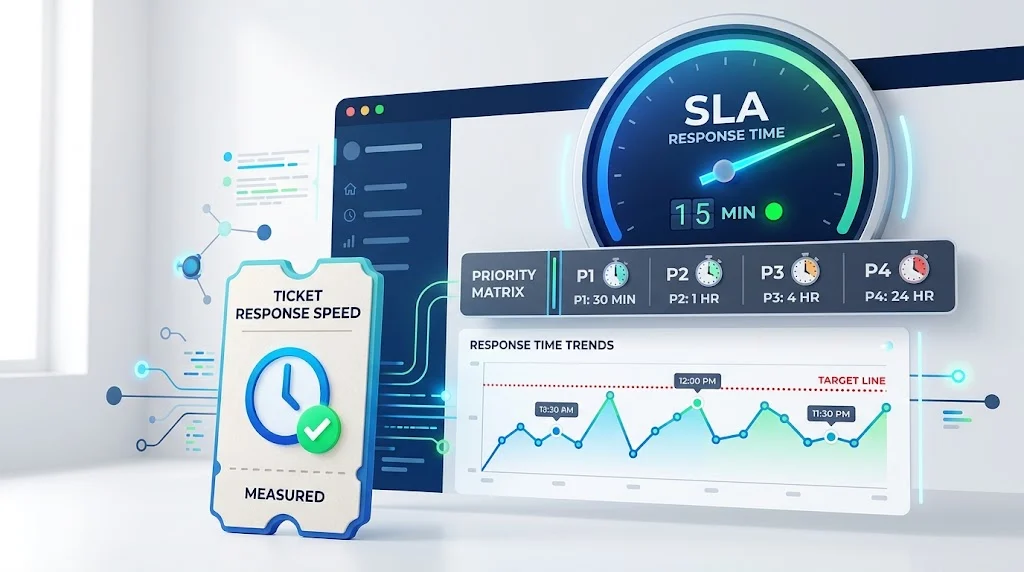
Quick Answer
SLA response time is the maximum time a service provider commits to acknowledge a customer’s request. It measures how quickly someone responds, not how quickly the problem is solved. For critical issues, a good target is 15 to 30 minutes. For standard requests, four to eight business hours.
When a customer submits a support ticket, the clock starts ticking. That clock is governed by an SLA response time, which is a documented commitment that defines the maximum time a customer can expect to wait before hearing back.
This metric matters because it directly shapes how customers perceive your service. A fast acknowledgment tells the customer they were heard. A slow one tells them they were ignored. Research shows that 89% of customers expect a reply within one hour, yet the average company takes over 12 hours to respond.
But response time is not the same as resolution time. Confusing the two leads to mismatched expectations, poorly designed SLAs, and frustrated customers. This article explains what SLA response time actually measures, how it differs from resolution time, how to set realistic targets, and what benchmarks to aim for.
What Is SLA Response Time?
SLA response time measures the duration from when a customer submits a request or reports an issue until a support agent formally acknowledges it and begins taking action.
The clock starts when the ticket enters your system, whether through a portal, email, phone, or chat. It stops when a technician or automated system provides the first meaningful response to the requester.
A meaningful response is not an automated acknowledgment. It is a human reply that addresses the customer’s question or confirms the issue is being worked on. A reply like “We have received your printer issue and assigned it to our hardware team” fulfills the response SLA, even though the printer is not yet fixed.
SLA response time focuses specifically on initial acknowledgment speed rather than complete problem resolution. It demonstrates attentiveness and service availability. Resolution time measures complete problem-solving capability.
SLA Response Time vs Resolution Time
These two metrics are often confused. They measure different things and serve different purposes.
| Aspect | SLA Response Time | Resolution Time |
|---|---|---|
| Definition | Time to acknowledge and begin action | Time to completely solve the issue |
| Measurement start | When ticket is created | When ticket is created |
| Measurement end | When first meaningful response is sent | When issue is resolved and ticket is closed |
| Typical duration | Minutes to hours | Hours to days |
| Business impact | Affects user confidence and perceived responsiveness | Affects productivity and operational continuity |
An SLA might stipulate that high-priority work orders receive a response within 2 hours, while resolution takes up to 4 hours for critical issues. The response time is always shorter than the resolution time because acknowledgment comes before the fix.
A fast first response followed by silence still erases goodwill. An SLA is a documented commitment that defines the maximum response time a customer can expect, but teams should also set resolution targets to ensure the issue is actually solved.
How to Set SLA Response Times
Setting realistic SLA response times requires understanding your team’s capacity, customer expectations, and industry norms. A one-size-fits-all approach creates problems.
Step 1: Categorize Your Requests
Not all tickets are equal. Define clear priority levels based on business impact.
- P1 (Critical): Full system outage, security breach, or complete loss of service. Response target: 15 to 30 minutes.
- P2 (High): Major functionality broken or a department offline. Response target: 1 to 2 hours.
- P3 (Medium): Single-user issue or an error with a workaround. Response target: 4 to 8 business hours.
- P4 (Low): General questions, feature requests, or cosmetic issues. Response target: 24 to 48 business hours.
These benchmarks are widely used across IT support and managed services.
Step 2: Segment by Customer Tier
Enterprise clients often warrant faster targets than self-serve users. A tiered SLA allocates faster response times to customers with higher contract values or strategic importance.
For example, a SaaS company might offer:
- Enterprise: 15-minute response for critical issues
- Business: 1-hour response for critical issues
- Standard: 4-hour response for critical issues
Step 3: Define Business Hours vs Calendar Hours
A business hours SLA measures response time only during defined working hours. It excludes nights, weekends, and holidays to set fair targets. A calendar hours SLA counts every hour of every day.
Most organizations use business hours for standard support and calendar hours for critical or premium support. Be explicit about which clock applies. A ticket received at 5 p.m. on Friday may sit until Monday under a business hours SLA. Document this so customers understand what to expect.
Step 4: Set Escalation Thresholds
Define the point at which an unanswered request moves to a senior agent. Common thresholds sit at 75% and 100% of the SLA deadline. Set automated alerts at 70% or 80% of the SLA time limit to allow intervention before deadlines are missed.
Step 5: Audit and Adjust
Pull your average first-response and resolution times from help desk reports. Compare actual performance to your SLA targets. If you are consistently meeting targets with room to spare, tighten them. If you are consistently missing them, either adjust targets or add resources.
SLA Response Time Benchmarks by Industry
Industry context shapes what constitutes a reasonable response time. Here are typical benchmarks for 2026.
SaaS and Technology
SaaS customers expect rapid responses because software issues can block their work entirely. The standard benchmark for SaaS support is a first response within one to four hours during business hours. Enterprise SaaS contracts often include 15-minute to one-hour SLAs for critical issues, with 24/7 coverage requirements.
Retail and Ecommerce
Retail and ecommerce face the widest gap between customer expectations and actual delivery. Customers expect replies within one hour. Good first response time is under 4 hours; best-in-class is under 1 hour.
Logistics and Supply Chain
Logistics operates on tight timelines where delays cascade through supply chains. Response-time SLAs in this industry often require sub-hour commitments for shipment issues, tracking inquiries, and exception handling. After-hours coverage is essential because shipments move around the clock.
Financial Services
Financial services typically target response times of 4 to 8 hours for standard requests and under 2 hours for critical issues. Heavily gated by compliance and inbox security tools, this industry balances speed with regulatory requirements.
Healthcare
Healthcare targets response times of 4 hours for standard requests and under 2 minutes for live chat. Heavy spam filtering, strict IT policies, and long decision cycles all suppress response speeds compared to other industries.
Professional Services
Law firms, accounting practices, and consultancies typically follow longer SLA windows because their work involves complex analysis rather than transactional support. Same-day or next-business-day responses are common standards. Effective firms distinguish between routine communications and time-sensitive matters.
SLA Response Time Examples
Here are concrete examples of how SLAs are structured in practice.
IT Support SLA Example:
- P1 Critical: 15 to 30 minutes response, 4-hour resolution
- P2 High: 1 to 2 hours response, next business day resolution
- P3 Medium: 4 to 8 business hours response, 1 to 2 business days resolution
- P4 Low: 24 to 48 business hours response, 3 to 5 business days resolution
SaaS Support SLA Example:
- Critical: 1-hour first response, 24/7 coverage
- High: 2-hour first response, business hours
- Normal: 24-hour first response, business hours
Sales Lead Response SLA Example:
- Tier 1 leads: 5-minute response target with Slack alerts if no reply in 3 minutes
- Hot leads (demo requests): 5 to 15 minutes
- Cold outreach replies: 30 minutes to 1 hour
Best Practices for SLA Response Time
Tiered SLAs beat one-size targets. Urgent tickets get 30 minutes, standard tickets get 1 to 2 hours, low-priority tickets get same-day response. Avoid a single timeline for all tickets.
Separate response time from resolution time. Track them independently. Averaging them together hides the failures your SLA was written to catch.
Use business hours for SLAs; report calendar hours separately. Overnight and weekend hours distort email and ticket queues. Using business hours sets fair targets. Reporting calendar hours gives a fuller picture of customer experience.
Set automated alerts at 70% to 80% of the SLA time limit. This allows intervention before deadlines are missed. Early-warning thresholds prevent breaches rather than just documenting them.
Review breaches for patterns. A missed SLA is a data point. A pattern of missed SLAs is a systemic problem. Review breaches to identify root causes, whether they are staffing, process, or tooling issues.
Document escalation procedures. Define who to contact and what actions to take when an SLA is at risk. Escalation procedures should be part of the written SLA, not improvised.
Train employees on priority recognition. When employees know how to recognize different urgency levels and react to routine requests quickly, response times improve across the board.
Common Mistakes When Setting SLA Response Times
Setting unrealistic targets. A 1-minute response time for email support is not sustainable. Set targets based on channel, priority, and actual capacity.
Using the same SLA for all customers. Enterprise clients and free-trial users have different expectations and different contract values. Tiered SLAs match service to value.
Confusing response time with resolution time. A fast acknowledgment does not mean the problem is solved. Customers care about both. Track both.
Forgetting about business hours. A ticket received at 5 p.m. on Friday may sit until Monday. If your SLA says “4 hours,” customers will expect a response on Saturday morning. Be explicit about which clock applies.
Not accounting for channel differences. Live chat expects sub-minute responses. Email expects hours. Applying the same SLA across all channels creates mismatched expectations.
Overpromising to win business. Committing to a 15-minute response time without the staffing to support it damages trust when you fail. Set targets you can consistently meet.
Ignoring the customer’s perspective. An SLA is a promise. If customers do not perceive the service as responsive, the SLA is not working, regardless of what the metrics say.
Copy-Ready Template: SLA Response Time Policy
Use this template to document your SLA response time commitments.
text
Service Level Agreement: Response Time Policy
Effective Date: [Date]
Review Date: [Date]

Priority Definitions:
- P1 (Critical): [Definition]
- P2 (High): [Definition]
- P3 (Medium): [Definition]
- P4 (Low): [Definition]

Response Time Targets:
- P1 (Critical): [Time] during [business hours / calendar hours]
- P2 (High): [Time] during [business hours / calendar hours]
- P3 (Medium): [Time] during [business hours / calendar hours]
- P4 (Low): [Time] during [business hours / calendar hours]

Resolution Time Targets:
- P1 (Critical): [Time]
- P2 (High): [Time]
- P3 (Medium): [Time]
- P4 (Low): [Time]

Business Hours Definition: [Days and hours]
Escalation Thresholds: [Percentage of SLA time before escalation]
Escalation Contacts: [Names and roles]
Review Process: [Frequency and owner]
SLA Response Time: Frequently Asked Questions
What is a good SLA response time?
It depends on priority and industry. For critical issues, 15 to 30 minutes is a strong target. For high-priority issues, 1 to 2 hours and for standard requests, 4 to 8 business hours. SaaS support typically targets 1 to 4 hours for first response.
How is SLA response time different from resolution time?
Response time measures how long until the first meaningful reply. Resolution time measures how long until the issue is fully solved. Response time is always shorter. Both should be tracked separately in your SLA.
When does the SLA response time clock start?
Most commonly, the clock starts when the ticket enters your ticketing system. Some organizations configure it to start when a ticket is assigned to a specific team. Others pause the clock outside business hours. Document your trigger points clearly.
Should SLA response time use business hours or calendar hours?
Both are valid. Business hours SLAs are fairer to your team and common for standard support. Calendar hours SLAs are used for critical or premium support where 24/7 coverage is required. Be explicit about which applies.
What happens if you miss an SLA response time?
Missing an SLA damages trust and may trigger contractual penalties. Define escalation procedures for at-risk tickets. Set automated alerts at 70% to 80% of the SLA deadline to allow intervention before the breach occurs.
How do you set response time SLAs for different customer tiers?
Tiered SLAs allocate faster response times to customers with higher contract values or strategic importance. Enterprise accounts typically get 15-minute to 1-hour targets for critical issues, while standard users get 4 to 8 business hours.
What is the difference between first response time and every response time?
First response time is the time until the initial reply. Every response time (or next response time) measures the gap between each subsequent reply in an ongoing thread. A fast first reply followed by silence still erases goodwill.
How often should you review SLA response time targets?
Review your targets quarterly or every 90 days. Pull your actual performance data and compare it to your targets. If you consistently meet targets with room to spare, tighten them. If you consistently miss them, adjust or add resources.
Conclusion
SLA response time is a promise. It tells customers how quickly they will hear back. It is not the same as resolution time, and confusing the two leads to mismatched expectations. Set tiered targets based on priority and customer tier. Use business hours for fairness, and calendar hours for critical support. Track response time and resolution time separately. When you set realistic targets and measure them consistently, your SLA becomes a tool for building trust rather than a source of frustration.
Read More Related Articles :
- 350+ Cold Emails That Get Responses | Proven Templates, Tips & Examples In 2026
- 350+ How to Calculate Response Rate | Formula, Examples & Easy Guide In 2026
- 350+ Cold Email Response Rate | Benchmarks, Averages & Ways to Improve In 2026

Robert Bennett is a passionate writer and blogger who turns everyday ideas into engaging stories and thoughtful insights.
Writing for RespondLabs.com, he brings a clear, relatable voice to topics that matter.